Why Your Brand's Instagram Recommendations Fall Out of Sync
Social media managers, small business operators, and agency creative teams frequently handle competitive intelligence, market audits, and product research directly from their primary company handles. Over several months of spontaneous searches, ad hoc competitor visits, and accidental video completions, the underlying recommendation architecture becomes clouded. When a commercial account is used to check unrelated consumer trends, personal entertainment, or irrelevant vendor feeds, the discovery pipeline shifts away from your brand's core domain.
For a growing commercial brand, an uncalibrated feed wastes executive attention, obscures real competitor movements, and makes platform research inefficient. While suggested posts inside your private feed do not directly dictate how the platform distributes your public content to prospective buyers, maintaining a clean account state gives your team an accurate pulse on real trends in your specific sector. When your Explore grid is overwhelmed by viral distractions rather than relevant industry discourse, discovering collaborative partners, emerging hashtags, and niche creator developments becomes nearly impossible.
Professional social media workflows typically insulate strategic publishing from native discovery feeds. When you coordinate scheduled campaigns across multiple networks using the PublishKaro publishing app, your content calendar stays disciplined in structured spreadsheets while your team focuses on targeted community interaction on native platforms.
Understanding the mechanics of algorithmic tracking helps clarify why this drift occurs. Instagram uses passive consumption indicators—such as dwell time, video completion percentage, profile visits, and search queries—alongside active signals like saves, shares, likes, and comments. If an employee reviews an industry supplier who also posts unrelated consumer humor, the recommendation engine immediately treats that secondary category as a high-intent interest. Over time, these passive signals compound, displacing your core business topics.
When brands want to clear instagram algorithm assumptions and establish a focused operational dashboard, relying solely on sporadic "Not Interested" taps is insufficient. A complete reset provides the baseline needed to systematically retrain incoming discovery feeds.
How to Reset Instagram Suggested Content Using Built-In Settings
Instagram provides a native tool specifically designed to clear past behavioral signals across Explore, Reels, and Feed. This tool resets the profile's personalization baseline back to a clean slate without unfollowing accounts or deleting existing media.
Accessing the Reset Tool Step-by-Step
Follow these steps directly inside the mobile application on iOS or Android:
- Open your Instagram profile tab by tapping your display image in the bottom right corner.
- Tap the hamburger menu (three horizontal lines) in the top right corner to open Settings and activity.
- Scroll down to the section titled What you see and tap Content preferences.
- Select Reset suggested content.
- Tap Continue to review what changes occur.
- Review your current following list if prompted, allowing you to unfollow obsolete vendor profiles or inactive accounts that continue pulling irrelevant topics into your recommendations.
- Tap Reset suggested content to confirm the operation.
Once completed, Instagram treats your account as if it has minimal behavioral history regarding suggested posts, drawing recommendations primarily from basic geographic location and current following relationships.
What Changes Immediately After the Reset
Executing this reset does not delete your account's public assets, private message archives, or follower counts. Instead, it resets the personalization weighting models that determine your incoming feeds:
- The Explore Page: The Explore grid immediately drops personalized niche topics. For the first 24 to 48 hours, it will display broadly popular, high-engagement media tailored only to your account's geographic market and general demographic profile.
- The Reels Stream: Vertical video recommendations transition from hyper-specific past topics to generalized viral Reels. This offers an optimal blank canvas to reset instagram explore page clusters.
- Suggested Posts in Home Feed: In-feed recommendations from accounts you do not follow will dramatically decrease or pull exclusively from topics adjacent to accounts you currently follow.
Because this reset strips away both unwanted noise and useful historical tracking, your marketing staff must follow a proactive recalibration protocol over the subsequent fortnight.
Retraining Your Recommendations After the Reset
Resetting your recommendation baseline is only the initial action. Without deliberate secondary signals, the recommendation engine will rapidly rebuild assumptions using whatever content you browse during your next active session. Proactive calibration requires active negative and positive feedback.
Clearing Historical Search Terms
Search logs heavily inform the topics Instagram features across your Explore page. Purging old queries prevents past non-business research from repopulating your discovery streams:
- Go to Settings and activity.
- Tap Your activity.
- Scroll down to Recent searches.
- Tap Clear all in the top right corner to wipe historical account lookups, audio searches, and hashtag explorations.
Sending Deliberate Negative Feedback Signals
When suggested posts emerge on your home feed or Reels tab that do not match your operational focus, send explicit negative signals immediately:
- Hide Suggested Posts: Tap the three dots on any suggested feed image or carousel, then select Not interested. Instagram immediately hides the post and surfaces options to manage similar keywords.
- Filter Specific Words and Phrases: Inside Content preferences, open Hidden words. Add negative phrases, emojis, or jargon unrelated to your industry to suppress them from suggested captions and comments.
- Snooze Suggested Posts: In your home feed, whenever a suggested post appears, tap the three dots, select Not interested, and tap Snooze all suggested posts in feed for 30 days. This setting hides non-followed recommendations from the primary feed for a month.
Teams optimizing their distribution across networks often combine clean native feeds with structured workflow systems. Exploring our guide on how to auto publish from Google sheets to social media demonstrates how structured operations eliminate the need to linger casually in feeds during post distribution.
Feeding the Recommendation Engine Positive Signals
To teach the algorithm what your brand actually needs to monitor, establish a deliberate interaction protocol for 14 days:
- Search for Authority Accounts: Search for 10 to 15 verified trade organizations, major industry publications, leading direct competitors, and regional market analysts.
- Use Instagram Collections: Save high-value educational carousels and technical updates directly into categorized private Collections. The algorithm weights saves and direct shares far higher than passive likes.
- Control Dwell Time: Never linger on entertaining consumer videos that appear on Explore. Scroll past them immediately. Spend full watch time exclusively on video assets directly relevant to your commercial focus.
- Engage Thoughtfully: Leave professional comments on industry leaders' posts. This cements your profile's topical cluster within Meta's internal entity mapping models.
Businesses balancing organic reach with direct customer communication often integrate multiple channels simultaneously. For instance, pairing active audience engagement with an automated messaging strategy—such as learning how to set up a WhatsApp AI chatbot for business—helps keep community management orderly without requiring round-the-clock manual monitoring.
Audience Targeting vs. Personal Discovery Feeds
Many marketing managers ask whether how to reset instagram suggested content affects the visibility of their organic business posts to external audiences. It is critical to differentiate between internal recommendation consumption and outgoing content distribution.
Your internal feed reflects what Meta's models believe your staff profile wants to consume. In contrast, outgoing reach is governed by audience-side engagement, content relevance, format adoption, and official API integration parameters. Meta publishes comprehensive platform integration standards on the Meta for Developers Instagram Platform documentation.
If you run paid campaigns alongside organic publishing, ad performance operates under Meta Ads Manager delivery frameworks rather than profile feed preferences. Understanding technical configuration details—such as Meta ads engage-through attribution settings or executing structured launch strategies like our guide on how to set up Meta ads super burst—ensures your customer acquisition remains driven by business data rather than subjective feed habits.
For official business guidelines regarding campaign and organic asset management, consult the Meta Business Help Center.
When your creative team produces video creative to capitalize on industry trends spotted in a newly calibrated feed, maintaining production quality is essential. Video production rates vary by format, including motion graphics reels at ₹2,000–₹5,000 per 1-minute video, animated-film style 3D at ₹4,000–₹10,000 per 1-minute video, standard video editing for every feed at ₹1,000–₹5,000 per 1-minute video, and AI video at ₹3,000–₹10,000 per 1-minute video. For custom design, web engineering, and enterprise workflows, projects are quoted after a free call, at a fixed price agreed in writing.
Comparison Table
The following table outlines the different interventions available on Instagram to adjust recommendation feeds, how quickly they take effect, and their specific operational impact.
| Reset Method | Target Area | Effort Level | Duration of Effect | Primary Business Use Case |
|---|---|---|---|---|
| Reset Suggested Content | Explore, Reels, Home Feed | Low (1-click native menu) | Immediate baseline reset | Eliminating long-term topical bias from historical browsing |
| Snooze Suggested Feed Posts | Home Feed only | Very Low | Temporary (30 days) | Focusing exclusively on followed accounts during busy campaign cycles |
| Clear Search History | Explore Search & Suggestion dropdown | Low | Immediate | Removing legacy research queries and competitor checks |
| "Not Interested" Marking | Specific post categories / formats | Ongoing | Incremental | Teaching the engine to stop surfacing specific niches or formats |
| Hidden Words Configuration | Captions, comments, suggestions | Low initial setup | Persistent until edited | Blocking sensationalist, toxic, or completely irrelevant topics |
| Following Audit | Entire account profile | Moderate to High | Long-term | Removing outdated brand connections that seed unwanted suggestions |
Visual guide
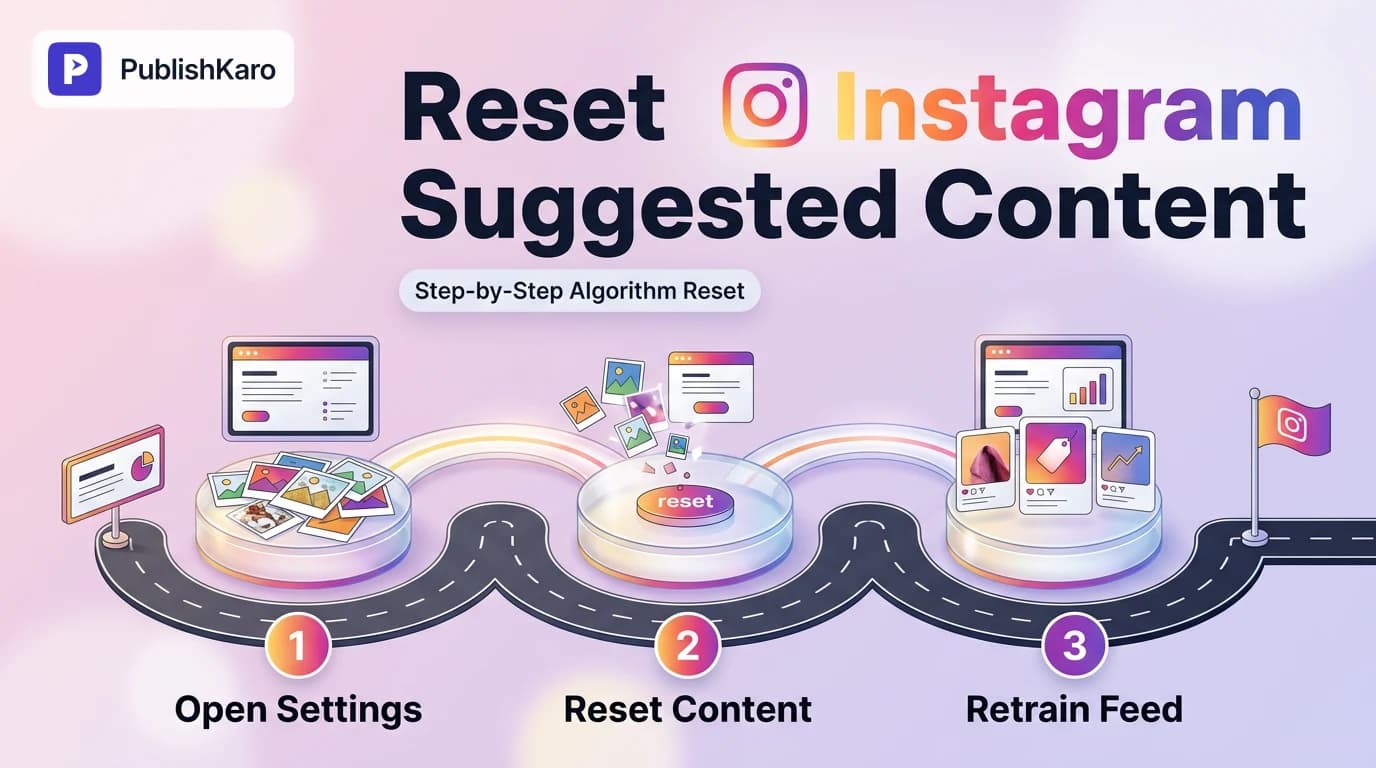
Native Suggested Content Reset Process
Follow this step-by-step sequence in your Instagram account settings to reset your recommendation history across Explore, Reels, and Feed.
Handling Unwanted Feed Posts
Choose the right negative feedback action when an irrelevant suggested post appears on your commercial handle.
Rebuilding Your Business Discovery Feed
These four positive feedback inputs actively retrain Instagram recommendation models around your industry niche.
Practical Examples
Example 1: B2B Industrial Machinery Manufacturer
An operations manager at an industrial packaging firm routinely used the company Instagram account to source local delivery providers and office furniture. Within three months, the firm's Explore page and Reels feed became dominated by home design inspiration and retail consumer hauls. The team executed the native Reset Suggested Content workflow, cleared the search cache, and added keywords like "decor", "haul", and "unboxing" to their Hidden words registry. Within one week of deliberately following packaging machinery manufacturers and industrial engineers, their feed transformed into a focused B2B intelligence hub.
Example 2: Multichannel Retail Brand
A retail fashion company running aggressive acquisition campaigns found that internal staff members were continuously distracted by viral meme pages in the brand's main feed. While the performance marketing team relied on disciplined ads management to scale revenue, daily content creators needed an accurate perspective on actual apparel design trends. The social lead applied the 30-day suggestion snooze and conducted a complete following audit. Concurrently, the firm centralized all scheduled publishing tasks through social media workflows, allowing the creative team to engage strictly with curated fashion creators.
Example 3: Boutique Professional Services Firm
A regional corporate tax advisory firm shared access to its primary Instagram account across three junior marketing interns. Over four months of event research, catering coordination, and casual browsing during travel, the firm's Explore recommendations degenerated into local restaurant reviews and lifestyle vlogs. The senior communications officer initiated a comprehensive reset. The team executed the built-in recommendation wipe, pruned 85 inactive vendor accounts during the integrated following review, and set up negative keyword filters for "foodie", "recipe", and "travel". By establishing a shared policy where team members only engaged with verified accounting boards, tax attorneys, and financial media, the firm reconstructed its Explore feed into an executive market tracker within ten business days.
Checklist
Use this operational checklist whenever your organization needs to audit and reset an Instagram profile's suggestion parameters:
- Confirm that your mobile application is updated to the latest stable iOS or Android release.
- Open Settings and activity > Content preferences > Reset suggested content.
- Confirm the reset prompt and review your current following list for obsolete accounts.
- Navigate to Your activity > Recent searches and tap Clear all.
- Access Content preferences > Hidden words and enter negative operational keywords to suppress.
- Check your primary home feed; if recommendations persist, tap the post menu and select Snooze all suggested posts in feed for 30 days.
- Identify 10 high-value industry authority accounts and engage with their latest three posts to seed new algorithmic signals.
- Save at least 5 relevant industry posts into categorized internal Collections.
- Audit connected operational tools and schedule standard outgoing content via the PublishKaro publishing app to maintain scheduled distribution without uncontrolled feed interaction.
- Review the Explore tab after 7 days to verify that topical alignment has stabilized.
Aligning Organic Operations with Long-Term Brand Growth
Resetting your suggestion feed is an operational maintenance task that saves team time and ensures market awareness. However, long-term social commerce success requires building sustainable owned digital real estate alongside your social channels.
Many brands over-rely on social algorithms while neglecting core website infrastructure. Ensuring that your technical web foundations perform smoothly is vital when converting social followers into customers. For instance, optimizing technical web metrics as detailed in our guide on how to fix Shopify interaction to next paint (INP) and auditing your technical benchmarks against Google Core Web Vitals guidelines ensures that user traffic landing on your store converts effectively. Speed optimization is equally critical for content-heavy sites; reviewing our insights on website speed optimization for small business provides a framework for reducing bounce rates on campaign landing pages.
Similarly, maintaining high-performance custom websites, robust Shopify stores, and modern WordPress sites safeguards your customer journey regardless of social media algorithmic shifts. When businesses plan digital modernizations, reviewing practical investments—such as reading about how much does rebranding cost small business owners or learning how to switch to block theme WordPress—helps leadership make measured capital allocations.
Whether your brand requires end-to-end SEO & Google Business alignment following the Google SEO Starter Guide or full-funnel digital execution through our all PublishKaro services catalog, establishing reliable workflows protects your team from platform volatility. For technical teams structuring complex product schema, review the documentation on Google Structured Data Guidelines to maximize organic search visibility.
To browse more practical playbooks on modern digital growth, explore our comprehensive index of all PublishKaro articles and our dedicated social media resources.
Key Takeaways
- Understanding how to reset Instagram suggested content requires leveraging the built-in Reset suggested content setting located under Content preferences.
- The reset feature resets personalization profiles across Explore, Reels, and your home feed without deleting posts, archives, or followers.
- You must actively retrain the platform after a reset by clearing recent search histories, setting negative keywords, and saving relevant niche content.
- Resetting your internal feed preferences does not diminish or alter your brand's outgoing reach to target audiences.
- Outgoing content operations should be decoupled from platform browsing by adopting disciplined multi-channel tools like the PublishKaro publishing app.
Frequently asked questions
Does resetting suggested content unfollow accounts or delete posts?
No. The reset tool only clears the algorithmic behavioral profile used to generate automated recommendations. It does not unfollow your contacts, delete your published posts, remove draft content, or alter your account profile information.
How long does an Instagram content reset take to take effect?
The baseline reset is immediate. Once confirmed, your Explore grid and Reels tab revert to generalized regional content. The recommendation engine then begins re-adapting to your immediate interactions over the subsequent 48 to 72 hours.
Can I undo the suggestion reset once confirmed?
No. Resetting suggested content is a permanent action that clears your historical interaction data. If you change your mind, you cannot restore the previous state; you must manually interact with your preferred topics to retrain the algorithm.
Does this reset improve my business account's organic reach?
No. Resetting your suggested content only affects what your account sees, not what your audience sees. Outgoing distribution is determined by engagement quality, content formats, and platform relevance rather than your personal discovery settings.
How often can I reset suggested content on Instagram?
You can execute the reset feature whenever your recommendations become uncalibrated. However, running it continuously is counterproductive because the engine requires consistent interaction data to surface helpful industry trends.
Will resetting suggested content stop all sponsored ads on Instagram?
No. Sponsored advertisements are managed separately through advertising auction delivery systems based on your account demographics and advertising settings, rather than organic content suggestion preferences. To adjust ad topics, access your ad preferences in Meta Accounts Center.