What Are WhatsApp Flows?
WhatsApp Flows are native, interactive UI components that render directly inside a WhatsApp conversation window. Instead of directing prospects to an external mobile browser or subjecting them to a drawn-out, ten-minute text-based questionnaire, a Flow opens a structured, multi-screen interface. Within this interface, prospective clients can type into validated text inputs, choose dates from visual calendars, pick service options from dropdown menus, and submit detailed requests without ever exiting their active chat session.
For commercial teams focused on customer acquisition, this system bridges the long-standing gap between real-time conversational engagement and rigid, reliable data capture. While standard text automation works well for quick triage, capturing nuanced project requirements has historically been difficult inside messaging apps. If you have previously explored resources across the PublishKaro blog and examined AI automation architectures, you understand that reducing user friction is the single most effective way to protect conversion rates.
As outlined in the official technical documentation on developers.facebook.com/docs/whatsapp, Flows give businesses the ability to design ergonomic, multi-screen mobile experiences where component styling, field validation, and data routing are handled natively. Because the phone renders the UI locally, the forms open instantly, creating an intuitive submission flow that feels like a natural extension of the chat.
Why Traditional WhatsApp Lead Capture Fails
Before WhatsApp Flows became available, businesses attempting to capture inbound leads through messaging channels were forced to rely on two primary mechanisms. Both approaches carried severe operational limitations that depressed conversion rates and burdened sales pipelines.
The External Landing Page Bottleneck
In the traditional model, a company runs digital advertisements or shares deep links inviting prospects to chat on WhatsApp, only to immediately redirect them to an external web landing page via an automated message link. The moment a user clicks an external link on a mobile device, several failure points emerge:
- Browser Handoff Latency: Switching from WhatsApp to an external browser such as Safari or Chrome introduces load delays, particularly on fluctuating cellular connections.
- Loss of Session Context: Prospects frequently abandon external browser tabs or fail to return to the messaging thread once the form is submitted.
- Input Resistance: Mobile web forms often require users to manually type their phone number and country code, leading to frequent formatting errors and abandoned forms.
The Tedious Conversational Questionnaire
To bypass external links, many businesses shifted to automated conversational chatbots that asked questions sequentially through standard text messages. While this kept the user inside WhatsApp, it introduced new structural problems:
- High Friction Across Multiple Turns: Requiring eight consecutive messages to collect a prospect's name, email, company, budget, and timeline creates immense fatigue. Drop-off rates rise with every additional text turn.
- Fragile Field Parsing: If a prospect responds to "What is your budget?" by answering "Not sure yet, can you call me tomorrow at 3?", a standard keyword rule often misinterprets the data, corrupting database records.
- Lack of Overview: Prospects cannot review or edit their answers prior to submission. If they mistype their corporate email on question three, they cannot correct it on question six without restarting the entire conversation.
By leveraging structured whatsapp lead qualification forms, your organization eliminates both obstacles. The prospect views all fields together in a structured visual layout, fills out the information in seconds, and returns to the chat thread with a single confirmation tap.
How WhatsApp Flows for Lead Generation Work: Step-by-Step
Successfully implementing WhatsApp Flows requires a clear, deliberate methodology spanning your API setup, screen logic, backend endpoints, and CRM integrations. Here is the operational process from configuration to active acquisition.
Step 1: Establish Your WhatsApp Business API Account
WhatsApp Flows are an enterprise feature built exclusively for the WhatsApp Business Platform (Cloud API or On-Premises API). They cannot be built or distributed through the standard, free WhatsApp Business consumer app. To access the necessary tooling:
- Verify your Meta Business Manager account to unlock full messaging limits.
- Set up a dedicated WhatsApp Business Account (WABA) and register an active, clean phone number.
- Configure your API credentials inside the Meta Developer Portal.
If your organization requires end-to-end technical configuration, partnering with specialized implementation engineers is often the fastest path to deployment. Our team delivers tailored setups through our AI automation services. In line with our transparent business approach, projects are quoted after a free call, at a fixed price agreed in writing, guaranteeing that your company maintains complete ownership of your Meta developer assets, API keys, and collected customer records.
Step 2: Define Qualification Architecture and Data Schema
Before creating UI components, list the minimum data points required for your sales team to evaluate and prioritize a lead. Resist the temptation to add unnecessary questions; every additional screen reduces final conversion volume.
For high-value service businesses, an effective schema typically includes:
- Full Name (Pre-populated from the user profile where feasible)
- Corporate Email Address (Enforced by string format validation)
- Service of Interest (Populated via single-select dropdown or radio chips)
- Project Scope or Budget Range (Tiered range selections)
- Preferred Consultation Window (Calendar date picker)
Step 3: Design the Native Flow Screens
Meta provides two distinct mechanisms for creating Flows: the no-code Flow Builder inside Meta Business Suite for standard layouts, and direct JSON authoring inside the WhatsApp Manager for complex, dynamic logic.
A proven lead generation architecture uses a lean, two- or three-screen layout:
- Screen 1 (Project Requirements): Let the user select their core category and challenge. Use interactive buttons and dropdown menus rather than open text fields to minimize typing on small screens.
- Screen 2 (Contact Information & Availability): Include fields for the prospect's work email and an optional date picker for an introductory consultation.
- Screen 3 (Confirmation & Review): Present an uneditable summary of the selected data points with a primary "Submit Request" button.
Always enforce strict input validation rules. Applying regex checks to email fields prevents junk submissions from entering your database, echoing the verification practices used to lower email bounce rates under 2 percent.
Step 4: Configure Secure Webhook Endpoints
When a user taps "Submit", WhatsApp packages the collected inputs into an encrypted JSON payload and sends it to your designated endpoint. Setting up this data layer involves:
- Establishing an HTTPS endpoint capable of parsing POST requests within Meta's required response window.
- Decrypting the payload using your private application keys.
- Validating the customer's phone number against existing database records to prevent duplicate contacts.
- Routing the clean attributes into your downstream sales systems, such as HubSpot, Salesforce, or marketing engines like Klaviyo.
For detailed payload specifications, token validation, and encryption protocols, refer directly to the developer resources on developers.facebook.com/docs/whatsapp.
Step 5: Implement Inbound Entry Points
An interactive Flow delivers value only when prospective buyers actively discover it. Deploy multiple inbound paths to maximize exposure:
- Click-to-WhatsApp Ads: Run paid social campaigns across Facebook and Instagram where the primary call to action opens a WhatsApp conversation containing an automated message that launches the Flow. If you run paid campaigns, align these ads with structured ads management to ensure clean audience targeting.
- Website Conversion Widgets: Add click-to-chat widgets across your custom websites, specialized landing pages, or Shopify stores. Use standard
wa.melinks configured with URL parameters that trigger the lead Flow instantly. - Organic Brand Touchpoints: Feature WhatsApp chat links across your verified social profiles, using scheduling and publishing platforms like The PublishKaro publishing app to direct social audiences toward native chat funnels.
Comparison Table
Comparing WhatsApp Flows to traditional mobile lead generation channels illustrates why native forms deliver superior completion rates and cleaner data hygiene.
| Feature / Metric | WhatsApp Flows | Traditional Mobile Landing Page | Conversational Text Chatbot |
|---|---|---|---|
| User Environment | In-app native UI (Zero tab switching) | External web browser redirect | In-app standard chat thread |
| Render Latency | Instantaneous mobile rendering | Dependent on web hosting & connection | Instantaneous text message delivery |
| Field Validation | Built-in regex and UI constraints | Built-in HTML5/JS form validation | None (Unstructured free text) |
| Data Input Speed | Rapid (Multi-field screen submission) | Moderate (Mobile browser keyboard lag) | Slow (Sequential, multi-turn messages) |
| Phone Verification | Inherently verified by WhatsApp account | Unverified (Prone to fake digits) | Inherently verified by WhatsApp account |
| Drop-Off Vulnerability | Very low (Frictionless single tap) | High (Page load drop-offs, pop-up blocks) | High (Fatigue across multiple questions) |
| CRM Synchronization | Instantaneous via JSON webhook | Standard web form handler | Complex NLP or string extraction parsing |
Visual guide
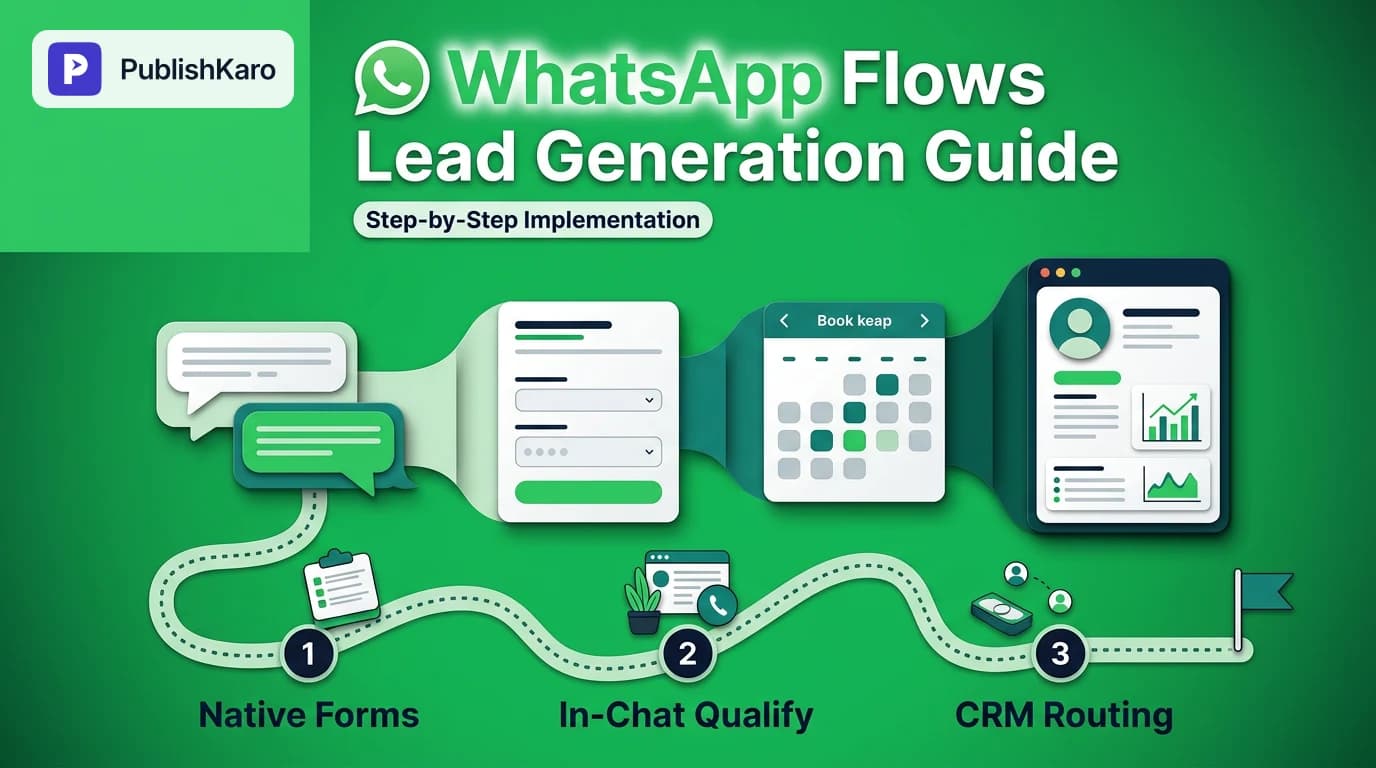
Setting Up WhatsApp Flow Lead Capture
Follow this technical sequence to launch interactive qualification forms and sync clean leads to your CRM.
User Journey Through WhatsApp Flows
See how prospects move from initial discovery to CRM synchronization without ever leaving the WhatsApp chat window.
Inbound Traffic Sources Powering Flows
Multiple digital marketing channels route inbound prospects directly into your native WhatsApp qualification form.
Practical Examples
To see how WhatsApp Flows function across different sectors, consider these three real-world deployment models.
Practical Example 1: B2B Technology Consultancy
A high-growth software consultancy wanted to qualify enterprise discovery calls without sending prospects to an external scheduling page that loaded slowly on mobile devices. They integrated a WhatsApp Flow triggered from high-intent technical service pages on their custom WordPress site.
- Inbound Trigger: A visitor browsing technical capabilities clicks a floating button labeled "Check Project Fit via WhatsApp".
Interactive Flow:
- Screen 1 (Technical Scope): The prospect uses single-select radio buttons to choose their core interest: Cloud Migration, Custom Architecture, or API Modernization.
- Screen 2 (Timeline & Scale): A dropdown asks for the estimated launch window (Under 30 days, 1 to 3 months, or 3+ months) and infrastructure scale.
- Screen 3 (Business Contact): The prospect provides their work email address and selects a consultation date from the visual calendar picker.
- Data Handling: The webhook decrypts the submission, checks the domain against the company's CRM, automatically creates a new deal record, and posts an alert to the sales engineering channel. Simultaneously, the prospect receives an immediate in-chat confirmation containing a calendar invitation file.
Practical Example 2: Commercial Real Estate Leasing Agency
A commercial property brokerage running targeted campaigns across Facebook and Instagram deployed Click-to-WhatsApp ads to capture office leasing inquiries from business founders.
- Ad Campaign Creative: Video demonstrations of available executive spaces, backed by structured campaign management under ads management.
- Inbound Trigger: Users tap "Send Message", opening a chat pre-populated with an intro message and an interactive card titled "Request Property Availability".
Interactive Flow:
- Screen 1 (Space Requirements): Users select their preferred commercial district and specify desk capacity requirements (1–10, 11–50, or 50+ workstations).
- Screen 2 (Lease Terms): Users pick their target move-in month and preferred lease structure (Flexible monthly vs. Long-term commercial).
- Screen 3 (Verification): Users confirm their full legal name and corporate email address.
- Data Handling: Submissions outside the agency's geographical coverage receive an instant, automated referral message, while matching corporate inquiries are routed directly to regional leasing agents within two minutes.
Practical Example 3: Specialized Executive Training Academy
A professional education provider offering certification programs for senior leaders drives organic engagement through social media. By sharing analysis and program highlights scheduled via The PublishKaro publishing app, they route interested executives to their WhatsApp profile link.
- Inbound Trigger: Executives tap the profile link, which sends an automated welcome prompt with a native Flow labeled "Check Course Eligibility".
Interactive Flow:
- Screen 1 (Career Stage): The candidate selects their current management level (Director, VP, or C-Suite).
- Screen 2 (Specialization): The candidate chooses between AI Strategy, Operations Leadership, or Financial Modeling.
- Screen 3 (Enrollment Window): The candidate selects an upcoming cohort start date and enters their corporate email.
- Data Handling: The platform passes the data to the admissions system. Executives who meet cohort criteria receive a personalized video message and syllabus via WhatsApp, while applicants seeking entry-level content are directed to public webinar resources.
Technical Best Practices for Designing WhatsApp Flows
Designing native in-chat forms requires a focus on mobile usability and reliable API performance. Apply these technical practices to maximize completion rates and maintain data integrity:
1. Prioritize Structured Selectors Over Free-Text Inputs
Typing long answers on mobile keyboards causes typos and user drop-off. Wherever possible, use native UI elements like dropdown menus, radio lists, and checkbox pickers. Reserve open text inputs exclusively for personal identifiers like names and corporate email addresses. This keeps submissions quick and ensures your CRM receives uniformly formatted data.
2. Implement Regex Validation on Critical Fields
Do not rely on downstream manual cleanup to catch invalid entries. Configure strict regular expression rules directly in your Flow JSON schema for fields like business emails and website URLs. If an applicant enters an invalid format, the native screen highlights the issue immediately, ensuring only clean records reach your sales team.
3. Maintain Instant Server Response Windows
Meta's Cloud API requires webhooks to respond to incoming payload pings quickly, typically within three seconds. If your endpoint takes too long to process a submission, the user's phone displays a delivery error, even if your server eventually records the data. Ensure your ingestion architecture uses asynchronous processing: return an immediate 200 OK status to WhatsApp, then process CRM syncing and email routing in the background.
4. Close the Conversational Loop Immediately
Never leave a prospect waiting in a silent chat thread after they tap submit. The moment your webhook receives a successful payload, send an automated text confirmation back to the user within two seconds. An effective confirmation reads:
"Thank you, Sarah. We have received your consultation details. Our team is reviewing your project requirements and will follow up during your selected window."
Pairing this immediate messaging touchpoint with automated email notifications through platforms like Klaviyo establishes an attentive, professional brand experience from the very first interaction.
5. Review Platform Policies and Advertising Standards
Collecting customer information through WhatsApp requires strict adherence to privacy rules and advertising guidelines. Ensure that all forms include a direct link to your privacy policy and clear consent language. For detailed guidance on compliant messaging practices and ad setups, review the official documentation on facebook.com/business/help.
Checklist
Use this operational checklist before launching an inbound lead generation campaign using WhatsApp Flows:
- Meta Business Verification: Meta Business Manager is verified, and your WhatsApp Business Account is in good standing with billing enabled.
- Field Architecture Finalized: Qualification questions are focused on essential decision points, using single-select and dropdown components wherever possible.
- JSON Syntax Validated: All component keys, screen transitions, and input validation rules pass syntax checks in the WhatsApp Flow Builder sandbox.
- Secure Webhook Implemented: An HTTPS endpoint is configured with valid SSL certificates, ready to decrypt payloads and return asynchronous
200 OKresponses. - CRM Field Mapping Tested: Flow payload keys are mapped directly to matching custom properties inside your CRM or lead management software.
- Fallback Triggers Configured: Automated text-based fallback sequences are active for users running older WhatsApp app versions that do not support Flows.
- Immediate In-Chat Response Configured: A personalized confirmation message fires instantly upon successful form receipt.
- Attribution Tracking Integrated: Campaign source tags, UTM parameters, or ad IDs are passed through the payload to maintain accurate marketing attribution.
- Privacy Disclosures Displayed: Relevant privacy notices and data processing terms are clearly visible on the final submission screen.
Integrating WhatsApp Flows into an Omnichannel Strategy
WhatsApp Flows deliver the strongest return when deployed as an integrated component of a broader multi-channel acquisition strategy, rather than as an isolated messaging experiment. Aligning in-chat data capture with organic search marketing, content publishing, and lifecycle email automation creates a cohesive conversion engine.
For example, if your marketing team regularly publishes technical guides that rank well in organic search—applying best practices from the Google Search Central SEO Starter Guide—you can embed direct WhatsApp chat buttons within those high-intent resources. A prospective client researching complex problems can click a single button on your site, open a WhatsApp chat, and complete a qualification Flow in under sixty seconds, capturing high-intent demand before the prospect leaves your site.
Similarly, pairing native chat capture with structured organic publishing across professional social networks expands your inbound funnel. Maintaining consistent organic touchpoints using tools like The PublishKaro publishing app keeps your brand visible, while clear WhatsApp call-to-action links give your audience a direct, private channel to initiate business conversations. Combining responsive messaging with long-term brand building ensures your pipeline captures qualified leads across every stage of the buyer journey.
Key Takeaways
- Eliminate Mobile Friction: WhatsApp Flows replace slow-loading external landing pages and lengthy conversational chatbots with fast, native in-app forms.
- Protect Data Quality: Built-in form validation ensures that contact information, project scopes, and preferred dates arrive at your CRM cleanly formatted and ready for sales follow-up.
- Accelerate Conversion Speed: Prospects can complete structured qualification questions in a single screen, making it easy to capture high-intent inbound demand.
- Seamless System Integration: Built on the WhatsApp Business Platform, Flows deliver structured JSON payloads via webhooks, connecting directly with modern CRMs and marketing automation stacks.
- Retain Complete Infrastructure Control: When configuring technical conversational systems with partners like PublishKaro, ensure your business maintains direct ownership of all Meta developer assets, API credentials, and customer data.
Frequently asked questions
What are WhatsApp Flows?
WhatsApp Flows are interactive, structured native experiences built directly inside WhatsApp chats. They allow businesses to present multi-screen forms, booking pickers, and product selectors without redirecting prospects to an external web browser.
Do WhatsApp Flows require third-party software to build?
You can design basic Flows visually using WhatsApp Flow Builder in Meta Business Suite, or configure complex dynamic Flows via JSON scripts using Meta developer tools. Connecting them to external CRMs typically requires webhook endpoints or API integration tools.
How do WhatsApp Flows differ from standard chatbot questions?
Standard chatbots ask one conversational question at a time over several back-and-forth messages. WhatsApp Flows present native, structured screens where users complete multi-field forms, select drop-down options, and validate inputs before submitting all details in one tap.
Can I use WhatsApp Flows with Click-to-WhatsApp ads?
Yes, WhatsApp Flows can be triggered directly when a prospect clicks a Meta ad. The chat opens with an interactive template message that launches the Flow screen immediately, reducing bounce rates compared to external landing pages.
Are WhatsApp Flows secure for personal data collection?
WhatsApp Flows are protected by WhatsApp's native security protocols, and payload data transferred between the client and endpoints is encrypted. Businesses must adhere to regional privacy laws and Meta's developer terms when collecting customer data.
What happens if a customer has an outdated WhatsApp version?
When a user's messaging client does not support native WhatsApp Flows, Meta automatically handles the fallback by prompting the user to update their app or allowing your webhook to trigger an alternate text-based question sequence.
Explore additional marketing frameworks and technical implementation guides across our PublishKaro blog, or discover how our team builds scalable acquisition systems through our specialized AI automation services.