Why Modern Brands Require Responsive Logo Systems
For decades, corporate branding guidelines treated the company logo as an untouchable monument. Graphic standards manuals dictated precise clear space, forbidden color combinations, and strict prohibitions against separating logomarks from wordmarks. In print-only eras, that rigidity protected visual equity across business cards, packaging, and roadside billboards.
Today, branding lives on screens that change size constantly. A customer might interact with your business through an ultra-wide desktop monitor, switch to a smartphone browser header, tap a smartwatch alert, and view an avatar badge inside a social feed. When an intricate, multi-element crest is shrunk to fit an app icon or navigation bar, fine typography collapses into illegible noise, subtle gradients turn muddy, and brand recognition disappears.
Designing responsive logos does not mean changing your brand personality on every page. Instead, it involves building an adaptive brand identity—a intentional family of visual marks that scale gracefully across varied viewports while preserving essential brand signals.
When our team develops custom identities through PublishKaro's design & branding services, we build scalability directly into the vector source files rather than treating mobile screens as an afterthought.
The Four Core Tiers of a Responsive Logo System
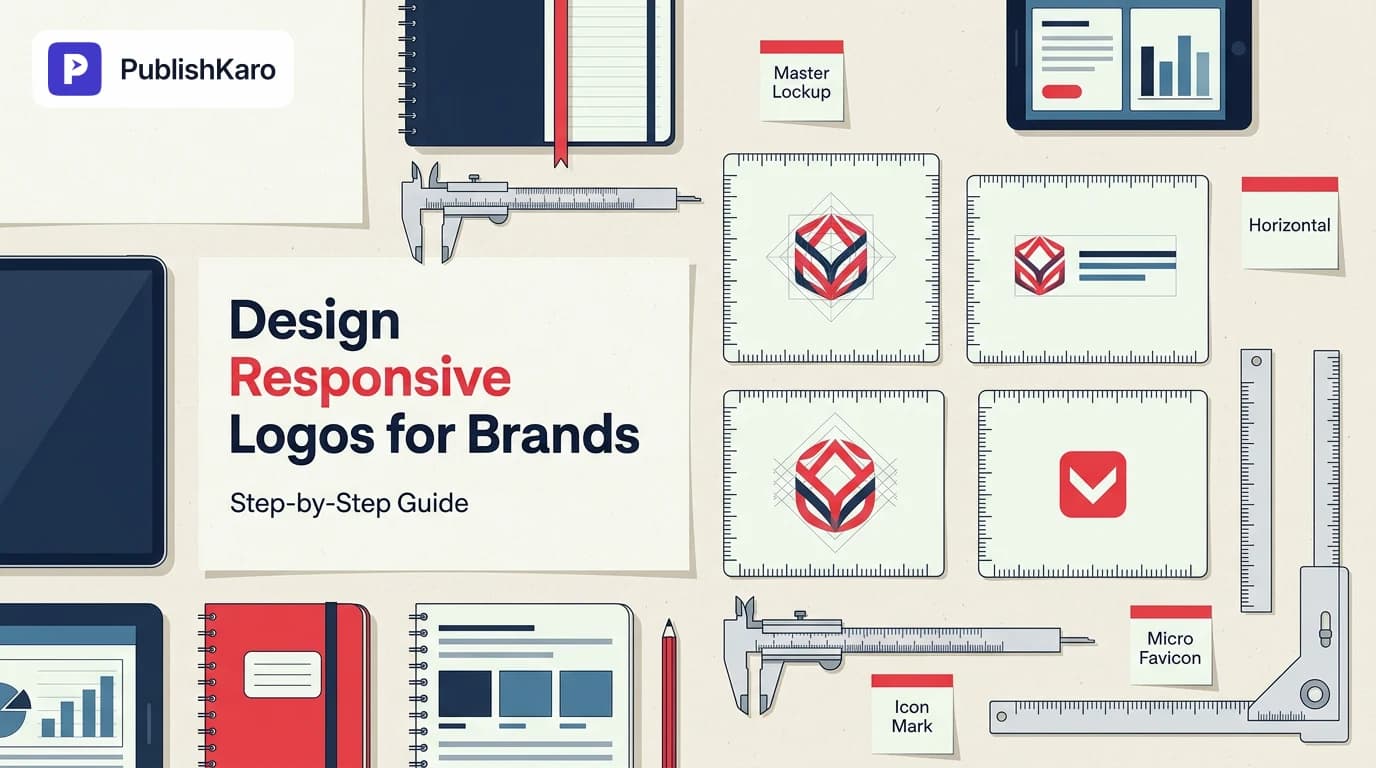
To build a reliable responsive logo design system, designers organize marks into four predictable tiers based on screen real estate, view distance, and physical rendering constraints.
[ Tier 1: Master Lockup ]    -> Detailed mark + wordmark + tagline (Large screens, print)
          │
          ▼
[ Tier 2: Standard Lockup ]  -> Logomark + primary wordmark (Desktop headers, decks)
          │
          ▼
[ Tier 3: Compact / Icon ]   -> Standalone symbol or monogram (Mobile bars, app icons)
          │
          ▼
[ Tier 4: Micro Mark ]       -> Simplified silhouette / favicon (16px browser tabs, badges)
1. Master Lockup (Full Display)
This is your foundational asset. It includes your primary symbol, company name, descriptor, and established tagline or founding year.
- Best for: Billboard placements, desktop hero sections, trade show booths, and premium merchandise.
- Design rules: Maximum visual detail, rich typography hierarchy, and deliberate negative space.
2. Standard Lockup (Horizontal / Header)
At typical laptop screen sizes, horizontal screen efficiency matters. The secondary tagline disappears first, because fine secondary lettering becomes illegible below 10 or 12 pixels in height.
- Best for: Sticky website navigation bars, email campaign banners, and invoice templates.
- Design rules: Balanced proportion between the standalone mark and brand name, usually positioned side by side rather than stacked vertically.
3. Compact Mark (Icon or Monogram)
When viewport widths fall below 768 pixels, horizontal header space shrinks rapidly. At this tier, the wordmark is removed entirely, leaving only an instantly recognizable visual mark, lettermark, or monogram.
- Best for: Mobile application navigation, social media profile avatars, and software dashboards.
- Design rules: Distinct silhouettes, bold exterior contours, and simplified internal negative space.
4. Micro Mark (Favicon / Tiny Contexts)
Rendered at physical footprints as small as 16×16 pixels or 32×32 pixels, normal vector paths blur due to subpixel rendering. The micro tier distills the symbol to its bare essence—often flattening multi-stroke shapes into a single solid shape or high-contrast silhouette.
- Best for: Browser tab favicons, mobile push notifications, and tiny UI status indicators.
- Design rules: No thin lines under 2px, no tight negative cutouts, and pure high-contrast values.
Step-by-Step: How to Design Responsive Logos for Brands
Creating an adaptable mark requires an intentional design workflow from concept to code. Follow these sequential steps to establish consistent logo scalability guidelines.
Step 1: Establish the Primary Visual Core
Begin by identifying the single non-negotiable visual element that triggers brand recognition. Is it a unique typographic quirk, an iconic geometric silhouette, or a memorable color combination? If your core visual identity relies on fine hatch lines or four different gradient stops, it will fail at micro scales. Sketch concepts on paper at standard card size first, then test their legibility by stepping backward three meters.
Step 2: Establish Minimum Legibility Thresholds
Define numerical rules for when elements drop out or adjust. For example:
- Keep full lockups above 240px wide.
- Switch to horizontal icon-plus-name lockups between 160px and 239px wide.
- Use standalone icon marks between 48px and 159px wide.
- Switch to simplified micro marks below 48px.
Document these break rules clearly so web developers and marketing teams know exactly which asset to deploy. If you are documenting these rules for your team, read our practical guide on how to build brand guidelines for small business to organize these constraints effectively.
Step 3: Thicken Line Weights at Smaller Scales
Geometric strokes that look balanced at 400px wide often vanish on mobile displays. When crafting smaller tiers, increase stroke widths by 15% to 30% relative to the overall symbol bounding box. This prevents thin vectors from fading into background colors under lower screen resolutions.
Step 4: Verify Digital Accessibility and Contrast
Brand marks must remain visible across dark and light modes, high-ambient outdoor sunlight, and varying screen brightness settings. Evaluate your background-to-foreground contrast ratios against the standards published in the W3C Web Content Accessibility Guidelines (WCAG). Ensuring your visual assets meet standard contrast ratios also supports broader digital compliance, as outlined in our guide on how to prepare your website for the European Accessibility Act.
Step 5: Clean and Optimize Vector Source Code
Exporting an SVG directly from design software often leaves behind unneeded metadata, clipping masks, and decimal-heavy coordinates that inflate file size and cause rendering shifts. Clean your SVGs by removing redundant layer groups, merging intersecting compound paths, and running assets through a vector optimizer before web deployment.
Clean vector assets keep web pages fast and responsive. Poorly optimized image files can trigger layout shifts and slow down initial server response times, leading to issues like those explored in our guide on how to fix high TTFB in WordPress.
Practical Examples
To understand responsive logo mechanics, consider these three real-world deployment scenarios:
Example 1: B2B SaaS Platform Deployment
- Desktop Dashboard (1440px wide): The application displays the Standard Lockup (geometric hexagon mark + modern sans-serif wordmark) in the top left header at 32px height.
- Mobile App Navigation (390px wide): The wordmark drops away. The header shows only the Compact Mark (the standalone hexagon mark) centered at 28px height, leaving space for the notification bell and profile avatar.
- Browser Tab Favicon (16×16px): The internal geometric details inside the hexagon are removed, leaving a bold, solid hexagonal silhouette that remains crisp and visible.
Example 2: Modern Direct-to-Consumer Ecommerce Store
- Homepage Hero Section: The site uses the Master Lockup, pairing a detailed botanical illustration mark, uppercase serif brand name, and the subtitle "Handcrafted Botanical Skincare."
- Sticky Scrolling Header: As the shopper scrolls product collections, the header shrinks to 60px. The tagline drops away, showing only the botanical symbol and brand name.
- Checkout Screen: In simplified checkout templates—such as stores optimized following modern ecommerce checkouts—the logo switches to a streamlined horizontal mark to minimize header clutter and keep buyers focused on conversion.
Example 3: Social Media & Multi-Platform Distribution
- Platform Avatars: Round avatars on Instagram, LinkedIn, and YouTube crop off square corners. A responsive identity uses a dedicated square-proportioned Compact Mark centered within a safe circular boundary.
- Watermarks and Motion Banners: Clean, horizontal standard lockups overlay cleanly across video clips and reels without covering key text.
When scheduling branded visual campaigns across multiple channels, teams using the PublishKaro publishing app can organize content across Google Sheets and push assets directly to Instagram, Facebook, LinkedIn, and YouTube with the correct visual aspect ratios intact.
Comparison Table
| Attribute | Tier 1: Master Lockup | Tier 2: Standard Lockup | Tier 3: Compact Mark | Tier 4: Micro Mark |
|---|---|---|---|---|
| Recommended Width | 240px – 1200px+ | 140px – 240px | 40px – 140px | 16px – 32px |
| Included Elements | Symbol, wordmark, tagline | Symbol + wordmark | Symbol or monogram only | Simplified silhouette |
| Primary Use Case | Billboards, print, hero banners | Website headers, invoices, decks | Mobile nav, app icons, avatars | Favicons, tiny badges, push alerts |
| Stroke Treatment | Standard proportional weight | Standard proportional weight | Thickened stroke (+15–20%) | Ultra-bold solid shapes |
| Typography Allowed | Primary + Secondary / Taglines | Primary brand name only | Monogram letter only (if any) | None |
| File Format | SVG, high-res PDF, PNG | SVG, WebP, PNG | SVG, WebP, PNG | SVG, ICO, 32px PNG |
Implementation Across Website Engines and Digital Touchpoints
Once your responsive logo assets are created, implement them cleanly into your digital infrastructure:
Responsive HTML and CSS Implementations
Modern web browsers allow dynamic switching of logo assets without heavy JavaScript scripts. By using the HTML <picture> element and media queries, developers can swap SVG files based on the user's screen width:
<picture class="site-logo">
  <!-- Mobile viewports: show compact mark -->
  <source media="(max-width: 640px)" srcset="/assets/logo-compact.svg">
  <!-- Tablet and laptop viewports: show standard lockup -->
  <source media="(max-width: 1024px)" srcset="/assets/logo-standard.svg">
  <!-- Desktop viewports: show master lockup -->
  <img src="/assets/logo-master.svg" alt="Company Name brand logo" width="180" height="48">
</picture>
This method keeps load times fast because the browser downloads only the image asset matching the active viewport, avoiding unnecessary network overhead. Keeping image assets small also supports strong Core Web Vitals, which web.dev explains are essential for smooth page performance and user experience.
Whether you are launching on hand-built Next.js custom websites, running fast Shopify ecommerce stores, or building maintainable WordPress websites, responsive asset delivery prevents mobile layout shifts and improves browsing flow.
SEO and Structured Data Considerations
While your front-end code adapts visual logos dynamically based on viewport sizes, your technical search engine optimization requires consistency. Search engines look for a single, high-resolution master asset when extracting organizational identity.
Always specify your canonical, square or standard master logo URL inside your Schema.org Organization markup, as documented in Google's structured data guide. Dynamic front-end swaps make your site easier to use, while structured data tells search crawlers which graphic represents your brand across search listings and Knowledge Panels.
Visual guide
Step-by-Step Responsive Logo Workflow
Follow this sequence from core concept to optimized code so your brand renders cleanly across any device.
Choosing the Right Logo Tier
Select the correct logo version based on available screen width to prevent clutter and maintain visual clarity.
How Dynamic Logo Delivery Works
A single web picture element detects screen boundaries and loads only the matching vector file.
Checklist
Use this practical quality checklist before finalizing and delivering your responsive logo system:
- Audit core recognizable elements: Confirm that your visual mark remains distinct even when separated from the brand name.
- Establish four distinct tiers: Create Master, Standard, Compact, and Micro versions within your vector design files.
- Adjust stroke weights for small screens: Increase line thicknesses on smaller marks to prevent subpixel disappearing.
- Test avatar safety margins: Place the Compact mark inside a 1:1 circle mask to verify no corners are clipped on social platforms.
- Inspect micro contrast: Test favicons at 16×16px on pure black, mid-grey, and pure white browser tabs to ensure legibility.
- Verify WCAG compliance: Confirm that colors against anticipated background surfaces satisfy recommended contrast minimums.
- Clean vector code: Flatten overlapping layers, convert outlines to filled paths where needed, and remove unnecessary software metadata.
- Configure Schema.org markup: Reference the canonical master logo in JSON-LD structured data for search crawlers.
- Document scale rules: Outline exact pixel switch points in your brand identity manual for external vendors and developers.
Common Mistakes to Avoid
- Simply shrinking the master logo uniformly: Scaling a complex 500px illustration down to 32px results in blurry, illegible shapes. Remove non-essential details as display sizes drop.
- Ignoring dark mode adjustments: A dark-colored mark that looks great on white cards becomes invisible on dark browser themes. Supply inverted, high-contrast versions for dark mode surfaces.
- Changing brand typefaces between tiers: Simplify shapes, but never change your core typographic voice. If the main lockup uses a distinctive geometric sans-serif, do not switch the monogram to an unrelated serif font.
- Neglecting square avatar bounding boxes: Placing an ultra-wide horizontal logo into an Instagram or LinkedIn circle avatar forces the graphic to shrink into a tiny, unreadable band. Always create a dedicated square mark.
For more design and identity strategies, explore our full library of articles on the PublishKaro design category blog or browse all PublishKaro marketing and design articles.
If you need an experienced design team to build an adaptive brand identity from scratch, explore our full list of PublishKaro services. Every project is quoted after a free introductory call, at a fixed price agreed in writing, and you own every account, master file, and delivered vector asset.
Key Takeaways
- Responsive logos are systems, not single files: An effective identity adapts across screen sizes using a coordinated family of related marks.
- Remove details progressively: Begin by removing taglines, then separate the wordmark, and finally simplify internal symbol linework at micro sizes.
- Adjust stroke weights deliberately: Vectors displayed below 48px require thicker proportional strokes to counter digital subpixel blurring.
- Use native web elements for responsive delivery: Implement HTML
<picture>elements to serve correct SVG files cleanly without layout shifts. - Retain canonical master assets for search engines: Keep your primary master logo linked inside structured data while serving responsive assets to human visitors.
Frequently asked questions
What is a responsive logo?
A responsive logo is an adaptive branding system consisting of multiple variations of a company mark tailored for different screen sizes and display contexts. Rather than scaling down a single complex graphic, a responsive system modifies, simplifies, or removes secondary details to preserve legibility and recognition everywhere it appears.
How many versions should a responsive logo have?
Most growing brands need three to four versions: a Master Lockup for wide displays and print, a Standard Horizontal version for website navigation bars, a Compact Mark for mobile headers and social media avatars, and a simplified Micro Mark for 16px favicons.
How do responsive logos work on websites?
Responsive logos are typically delivered using the HTML <picture> tag or CSS media queries. The browser checks the visitor's screen width and renders the appropriate vector file without requiring custom scripts or causing layout shifts.
Should the brand colors change in responsive logos?
Core brand colors should remain consistent across every tier to protect brand equity. However, designers should supply high-contrast light and dark variations of each tier so the marks render clearly across changing background surfaces and system themes.
What file formats are best for responsive logos?
Scalable Vector Graphics (SVG) is the standard format for web headers, icons, and interface displays because it renders sharply at any pixel density while keeping file sizes small. For legacy platforms and specific social media channels, high-resolution transparent PNG and modern WebP exports provide reliable fallbacks.