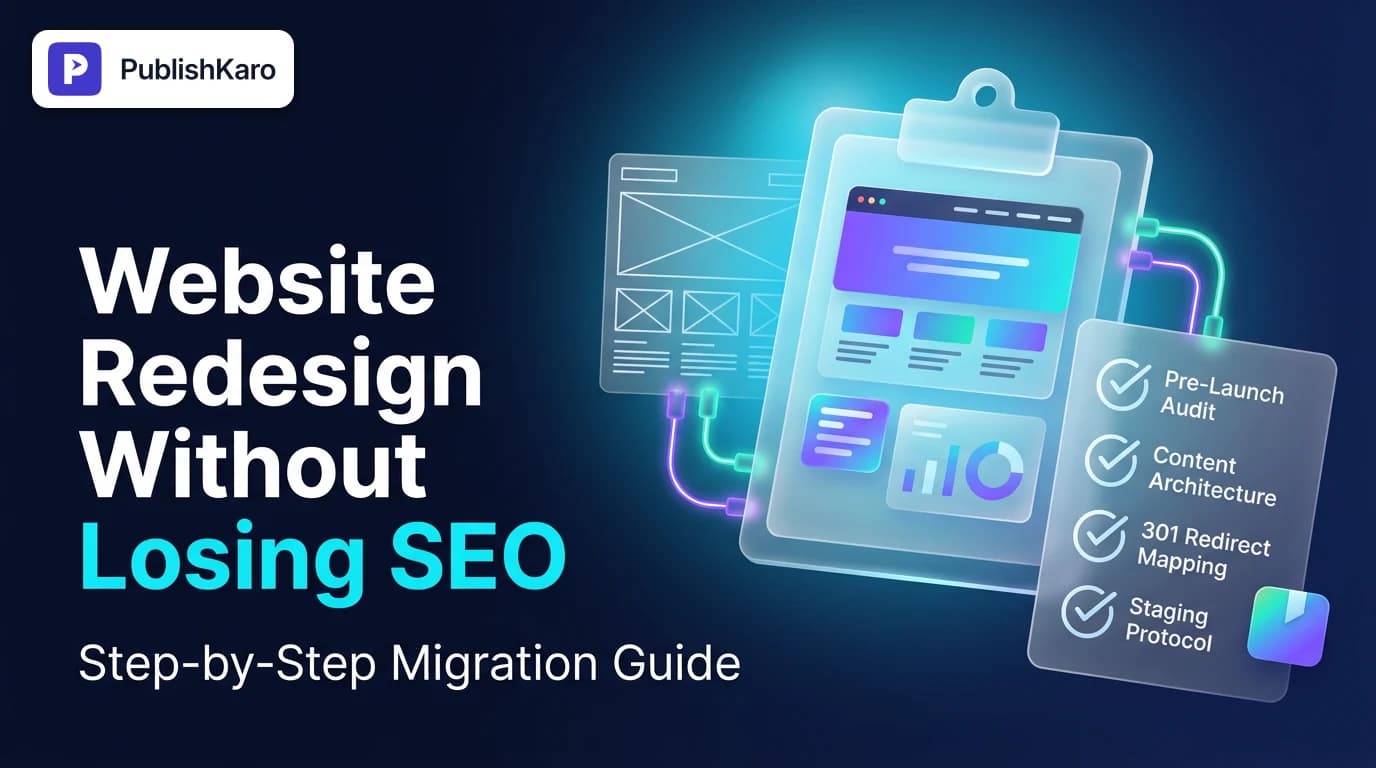
Why Website Redesigns Risk Organic Search Rankings
A website redesign frequently alters URL paths, page hierarchy, template code, and page copy simultaneously. When search engine bots re-crawl a revised domain, broken links, eliminated content, or missing title tags disrupt the signals that previously earned search visibility.
Search engines evaluate domains based on relevance, page experience, and internal link equity. If a business redesigns its storefront or company portal without preserving structured content and technical routing, search bots may interpret the update as a completely different, unproven website. Protecting rankings requires treating search optimization as an architectural foundation throughout the redesign rather than an afterthought applied at launch.
Whether moving to a modern framework or updating an established content management system, the objective is zero avoidable indexation loss. Adhering to proven website migration seo best practices ensures that historical domain trust transfers smoothly. Businesses updating WordPress sites or transitioning ecommerce storefronts via Shopify stores must account for platform-specific URL parameters, canonical structures, and taxonomy trees.
Phase 1: Pre-Launch Auditing and Benchmarking
Before touching visual themes, wireframes, or new code, you must establish an unshakeable record of your site's current organic footprint.
1. Perform a Full Baseline Crawl
Run an automated crawler across your production domain to export every existing indexable asset. Ensure your crawl captures:
- Internal URLs and their HTTP status codes
- Page titles, meta descriptions, and primary header tags (H1 and H2)
- Canonical tag targets
- Image file paths and alt attributes
- Structured data markup types
- Inbound internal link counts for every template
Save this crawl data securely in raw spreadsheets. It serves as your historical baseline if unexpected indexation drops require root-cause analysis.
2. Identify High-Value Organic Pages
Not all web pages carry equal search weight. Access Google Search Console and Google Analytics to export historical traffic, impressions, and click data. Highlight pages driving organic sessions and conversion revenue.
These high-equity URLs must retain their topical focus, search intent match, and primary metadata during the redesign. Removing substantial body text or trimming depth on top-performing landing pages frequently leads to keyword ranking decline.
3. Record Ranking Keywords and Technical Performance
Log current rankings for your target search queries alongside current Core Web Vitals metrics. Reviewing speed benchmarks across mobile and desktop environments establishes performance thresholds for the new build. According to Google Core Web Vitals documentation, real-user experience signals like Largest Contentful Paint (LCP) and Interaction to Next Paint (INP) directly influence search presentation and user retention.
For businesses planning extensive structural refreshes, consulting our dedicated SEO & Google Business services early ensures historical equity remains protected through every planning phase.
Phase 2: Information Architecture and Content Preservation
Designers often desire minimalist layouts with reduced textual content. However, stripping copy, removing contextual internal links, or flattening content categories weakens topical authority.
Protecting Content Depth and Keyword Intent
When refreshing page layouts, ensure that primary target keywords, supporting semantic phrases, and comprehensive answers remain intact. If an existing service page ranks well because it thoroughly addresses buyer questions, replacing that written content with visual iconography or short video embeds risks stripping the context search engines index.
Ensure headings follow strict structural hierarchy without skipping levels, keeping primary subjects prominent. Reviewing the fundamentals outlined in the Google SEO Starter Guide confirms that logical navigation and clear page hierarchy remain paramount for algorithmic evaluation.
Preserving Internal Linking Networks
Your internal linking structure distributes authority across related pages. If your legacy site featured helpful footer links, in-article contextual citations, or breadcrumbs, eliminating those elements in the new design isolates deep pages from search engine crawlers.
Audit your proposed navigation menus, contextual breadcrumb paths, and footer links to ensure bottom-funnel service pages and core informational posts maintain direct, crawlable paths from the homepage.
Phase 3: Staging Site Configuration and Technical SEO
Development of the new layout must take place on an isolated staging server that mirror-matches production behavior without creating duplicate indexation hazards.
Preventing Accidental Indexation on Staging
Never allow search engines to crawl your work in progress. Prevent indexation using HTTP authentication (password protection) or a strict noindex, nofollow robots meta tag applied globally across the staging environment. Relying solely on robots.txt disallow rules can still allow URLs to enter search results if external links point toward the development domain.
Preserving and Enhancing Structured Data
If your original site utilized schema markup—such as LocalBusiness, Product, Article, or Organization schema—ensure those properties persist on the new templates. Follow guidelines from Google structured data documentation to validate your JSON-LD implementations on staging using standard testing tools prior to publication.
Speed Optimization for Modern Frameworks
New visual elements, heavy scripts, and oversized media assets can degrade page speed. If you are building clean custom websites hand-built with performance-first architectures like Next.js, code splitting and server-side rendering keep execution overhead low. Teams managing open-source setups should consult standard WordPress documentation when configuring server caching, database cleanup routines, and lightweight block themes.
Phase 4: Constructing the 301 Redirect Map
A comprehensive 301 redirect map is the single most critical asset in protecting search performance during a site overhaul.
Rules for Mapping 301 Redirects
- Strict 1:1 Mapping: Map every retiring or modified URL to the exact equivalent page on the new site. Never route all legacy URLs to the homepage, as search engines evaluate bulk homepage redirects as soft 404 errors, causing equity loss.
- Eliminate Redirect Chains: Ensure legacy URLs route directly to their final destination in a single hop. Multiple consecutive hops slow crawl speed and dilute link equity.
- Preserve High-Value Backlinks: Match incoming links from external domains to identical topics on your new domain so earned referral authority passes forward uninterrupted.
| Legacy URL Example | Target Redesign URL | Mapping Rationale | Redirect Type |
|---|---|---|---|
/services/web-design.html | /services/web-design | Stripping legacy file extension | 301 Permanent |
/about-our-company | /about | Simplified URL hierarchy | 301 Permanent |
/products/category/item-1 | /shop/item-1 | Streamlined ecommerce taxonomy | 301 Permanent |
/outdated-event-2021 | /events | Nearest relevant category parent | 301 Permanent |
Comparison Table
Understanding the operational trade-offs between different redesign strategies allows teams to select the appropriate level of technical governance.
| Redesign Approach | Risk to Existing SEO | Development Velocity | Equity Preservation Strategy | Best Suited For |
|---|---|---|---|---|
| In-Place Visual Refresh | Low | Fast | Preserve existing URLs, hierarchy, and core text while updating CSS/theme files. | Established sites with strong organic traffic needing modern aesthetics. |
| Structural URL & CMS Migration | Moderate to High | Thorough | Complete 1:1 redirect mapping, schema rebuild, and metadata parity checks. | Moving between CMS platforms or consolidating domain taxonomies. |
| Complete Brand & Replatforming Overhaul | High | Extended | Full architectural crawl, brand change signals, cross-domain redirect governance. | Mergers, acquisitions, or complete company rebranding projects. |
Visual guide
Website Redesign SEO Migration Workflow
Follow these five sequential phases to safeguard existing organic rankings, backlinks, and search traffic during a site overhaul.
Choosing Your Website Redesign Strategy
Determine your project scope based on whether your URL structure or content management system needs to change.
Launch Day Technical Verification Sequence
Execute these final technical checks in order to make sure search engine crawlers can index your redesigned site.
Practical Examples
Reviewing tangible redesign scenarios illustrates how technical decisions influence organic visibility across different business models.
Example 1: B2B Technology Provider Flattening Deep Hierarchies
A software consultancy maintained services nested under long folder strings such as /services/custom-software/enterprise/cloud-migrations.html. During their redesign, the team decided to simplify the information architecture to clean top-level slugs like /services/cloud-migrations.
Instead of launching and relying on site search to direct users, the team authored individual 301 redirects for every nested sub-service. They preserved the existing body copy, retained original header tags, and updated internal links across all case studies to point directly to the new slug. Consequently, search engines updated their indexes within days without dropping core rank positions.
Example 2: Local Multi-Location Brand Updating Architecture
A regional services provider serving multiple metro markets refreshed its website to improve mobile conversion rates. In their legacy setup, city-specific landing pages contained localized business schema and directions referencing their verified business profile. To maintain visibility in local map packs, as governed by standard Google Business Profile guidelines, the team kept city page URLs identical, preserved localized NAP (Name, Address, Phone) text in the footer, and updated their contact forms. Their local organic pack positions remained stable throughout launch.
Phase 5: Launch Day and Immediate Post-Launch Execution
Launch day requires tight coordination across development, marketing, and systems teams. Executing technical steps in strict order prevents indexing anomalies.
Step 1: Point DNS to Production Host
Step 2: Install and Verify SSL Certificate
Step 3: Remove 'noindex' Meta Tags and Staging Authentication
Step 4: Update robots.txt to Allow Search Bot Access
Step 5: Apply and Test Server-Side 301 Redirect Rules
Step 6: Submit Revised XML Sitemaps in Google Search Console
Step 7: Verify Web Tracking and Tag Manager Implementations
1. Remove Disallow and Noindex Directives
Ensure that all staging artifacts—such as noindex headers or global Disallow: / lines in robots.txt—are removed from the live production site. A common post-launch pitfall is accidentally deploying the staging robots configuration directly to the live domain, preventing search engines from evaluating the newly launched pages.
2. Verify Canonical Tags and Internal Links
Check page headers to confirm canonical tags reference absolute live production URLs using the correct protocol (https://) and domain formatting (e.g., consistent www or non-www). Run an internal link checker across the live site to locate and update any links still pointing to staging environments or legacy paths.
3. Deploy and Verify the XML Sitemap
Generate a clean XML sitemap listing only valid, canonical 200-status URLs on the new site. Submit this file immediately inside Google Search Console and Bing Webmaster Tools. This guides bots to index your new layout, templates, and content structures rapidly.
Phase 6: Monitoring and Post-Migration Maintenance
Monitoring organic health must continue for several weeks following launch to detect and address emerging indexation issues early.
Tracking Search Console Coverage and Indexing
Inspect the Page Indexing report within Google Search Console daily for the first two weeks. Monitor the emergence of unexpected 404 errors, redirect errors, or soft 404 notices. Use the URL Inspection tool on your top twenty organic landing pages to request manual re-crawling, accelerating algorithmic discovery.
Coordinating Paid Media and Multi-Channel Communications
During a website redesign, marketing initiatives should run in harmony. Ensure your teams managing active campaigns through ads management adjust their landing page destinations to match new URLs, eliminating wasted ad spend from redirect latency.
Similarly, cross-channel communications maintained by your social media services must update bio links, pinned assets, and promotional URLs. Teams using The PublishKaro publishing app can coordinate these updates across social feeds by managing planned posts in Google Sheets, allowing automated distribution to Instagram, Facebook, LinkedIn, and YouTube while tracking campaign status directly.
To explore complementary strategies for maintaining digital assets and website infrastructure, browse our full collection of all PublishKaro articles or review specialized publications in our Websites category.
Checklist
Ensure your team signs off on every item prior to and immediately following deployment:
- Export complete crawl data of legacy site including URLs, titles, headings, and status codes
- Identify and document top-performing landing pages driving organic traffic
- Keep staging environment blocked from public search bots via authentication or noindex tags
- Preserve existing high-ranking content depth, primary heading structure, and core semantic topics
- Construct comprehensive 1:1 301 redirect map for every altered or retired legacy URL
- Eliminate internal redirect chains and circular redirect loops
- Verify structured data (schema markup) passes validation on staging templates
- Remove all staging
noindextags and updaterobots.txtupon live deployment - Verify SSL certificate installation and canonical tag consistency across all pages
- Submit fresh XML sitemap containing only 200-status URLs to Google Search Console
- Monitor Search Console Indexing reports and 404 server logs daily for 30 days post-launch
Key Takeaways
- A redesign is an SEO migration: Every layout adjustment, slug modification, or taxonomy reorganization impacts how search engines crawl and evaluate your domain.
- Content parity maintains rankings: Stripping substantive copy or altering the topical focus of high-ranking landing pages directly damages search relevance.
- 1:1 301 redirects are essential: Mapping every legacy URL to its closest modern equivalent preserves earned authority and prevents soft 404 issues.
- Never deploy staging directives to production: Confirm robots meta tags and
robots.txtfiles allow full search bot discovery immediately upon going live. - Continuous post-launch auditing protects equity: Daily monitoring of indexing reports, live crawl errors, and conversion tracking ensures rapid remediation of any technical anomalies.
At PublishKaro, we quote every redesign project after a free technical discovery call at a fixed price agreed in writing, ensuring you retain complete ownership of every asset, file, code repository, and account throughout your digital transformation. Explore all PublishKaro services to build your roadmap.
Frequently asked questions
How long does an SEO dip usually last after a website redesign?
A temporary ranking fluctuation lasting a few weeks is normal while search engines re-crawl modified layouts and process 301 redirects. If comprehensive redirect mapping and content parity are maintained, rankings generally stabilize once the updated structure is fully indexed.
Should I change my URL structure during a redesign?
Whenever possible, retain your existing URL structure during a redesign to minimize disruption to established search equity. If you must adjust URL paths to improve site hierarchy or user experience, author precise 1:1 301 redirects from every old URL to its exact replacement.
Why did my traffic drop significantly after launching a new design?
Significant traffic drops usually result from missing 301 redirects, accidental noindex directives left on production pages, eliminated body content, or broken internal link networks. Crawling the live site against your pre-launch URL inventory will quickly highlight unmapped URLs or indexing blocks.
Do I need to keep 301 redirects in place permanently?
Yes, 301 redirects should remain in place permanently, or for at least one full year after launch. Retaining redirects ensures historical backlinks from external websites continue passing search authority and delivering referral visitors to the correct destination.
How do I safely test my new site before it goes live?
Build and test your new website on an isolated staging server protected by HTTP password authentication or global noindex robots meta tags. Run an automated crawler on staging to validate metadata, check internal links, and test structured data without exposing unfinished pages to search engines.
What happens if I redirect all old URLs to the homepage?
Redirecting multiple retired URLs to your homepage is treated as a soft 404 error by search engines. This practice fails to pass historical link equity to specific content topics and creates a confusing experience for visitors searching for specific information.